

Map out the build.
A workshop to analyse and design your information management, automation, intranet, or collaboration setup around how your business actually runs.

Construction moves fast, and your systems should too. Drawings change, budgets shift, and paperwork has a way of multiplying, especially when half your team is in the office, and the other half is on-site.
We have spent years helping construction, engineering, architectural, and real estate development businesses bring chaos under control. Not with a one-size-fits-all system, but with SharePoint solutions shaped around how your people actually get work done and, increasingly, with Copilot layered on top so your teams can find answers, not just files.
Here's how we usually see it play out.
We have helped 50+ construction, engineering, architectural, and real estate clients move through this journey, and we can help you get there, too, wherever you are starting from.
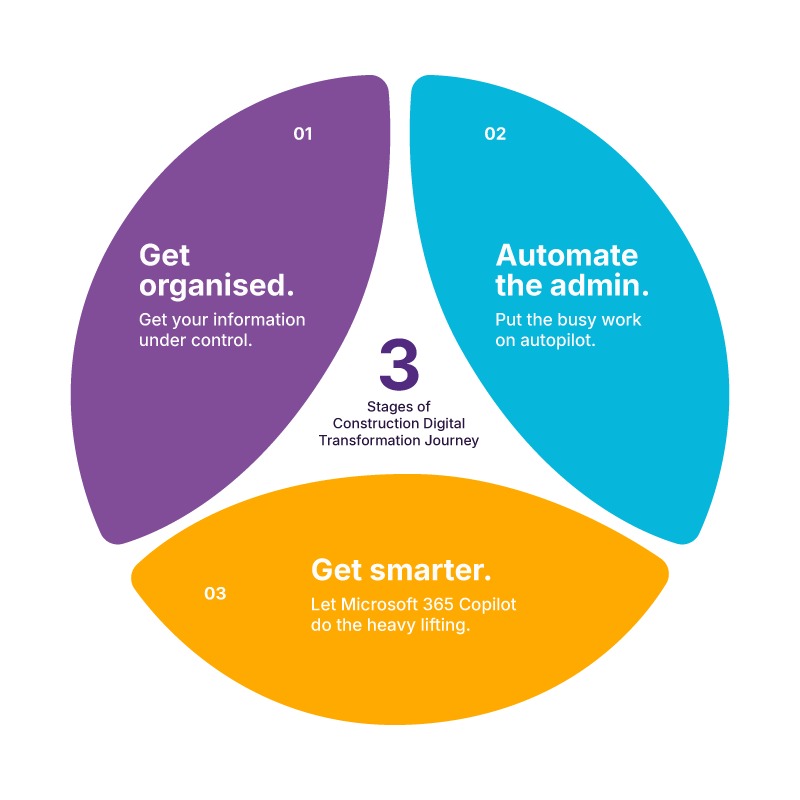
Drawings, specs, contracts, safety documents, and site diaries all live in one place, accessible on any device, whether someone is in the office or standing on a job site with muddy boots and a tablet.
Once your information has a proper home, the manual admin around it becomes the next thing to fix. Think about your site inductions, approvals, registers, and reports built as simple apps instead of paper forms and spreadsheets.
This is where it gets exciting. Once your documents and processes are properly organised, Copilot has something real to work with. It can help your teams find the right drawing, summarise a site report, or draft a policy update in seconds instead of scrolling through folders.
From Scattered Site to Smart Site
3 Stages of Construction Digital Transformation Journey
Built with your field crews in mind
Boost productivity, connect your teams, and make real-time collaboration second nature with SharePoint and Power Platform configured around your business.
Get safety information to the people who need it, when they need it, whether site-specific or company-wide.
Hold onto the know-how that makes your business good at what it does: best practices, toolbox talks, and trade secrets, all searchable.
Keep tasks, budgets, and resources visible in one hub, without having to chase five different spreadsheets.
Track what's where and who's on site, all in an editable list your team already knows how to use.
Make policies and procedures easy to create, find, and sign off on.
Simplify submission of a hazard report, completing a pre-start checklist, or entering time on a mobile device.
One place for the whole company to stay in the loop: news, announcements, and updates that actually reach the field, not just the office.
Record your field engineer’s daily site activities on the go using a mobile-ready form on SharePoint.
One secure home for every document, governed by lifecycle rules, sensitivity labelling, and template provisioning, so the right version is always the one people find.
Turn induction checklists into a simple, trackable digital process.
Find the right person, fast, across every office and every site.

Most Copilot rollouts stumble for one reason: the underlying information is messy. If your SharePoint environment isn't structured, secure, and properly governed, Copilot cannot give your teams good answers.
That's the advantage of doing this with PA. We have already helped construction and engineering businesses get their document management, policy management, and information architecture right, which means when it's time to bring in Copilot, you are not starting from scratch. You are picking up work that is already done.
We help finance, HR, IT, and generalist teams get real, practical value from Copilot, ensuring every team member knows how to use it well in their day-to-day roles.
We do not just hand over a license and wish you luck. Depending on where you are starting from, we can help you:
A workshop to analyse and design your information management, automation, intranet, or collaboration setup around how your business actually runs.

Whatever platform you are coming from, we will plan and run the migration so nothing gets lost in transit.

Connecting SharePoint to Power Platform, Azure, Dynamics 365 or other tools, or building something custom when the off-the-shelf answer is not quite right.

We consolidate sprawling Teams sites and channels into a structure that matches how your business actually runs.

Fast, expert support when something breaks, and you cannot afford your SharePoint or Teams to stay broken.
We have trained generalists, finance, IT, and selected departments to unlock the full potential of Microsoft 365 Copilot.


Knowledge Base
Helpdesk Ticketing
Contract Management
Quality Management System
Employee Resource Portal
Looking for an Australian Microsoft partner who actually understands construction and engineering? That's us. For almost 40 years, we have helped construction firms modernise how they work with SharePoint, Teams, Power Platform, and now Copilot.
No two construction businesses work the same way, so we don't force you into one.
We dig into your infrastructure, information management, and data security before we recommend anything.
Across Microsoft 365, Dynamics 365, and Azure, as a Microsoft Tier 1 CSP and a long-time Microsoft Solutions Partner for Modern Work, we are set up to help you get more from the technology you are already paying for.
Ongoing training, support, and maintenance, for as long as you need us.
With 90+ consistently high NPS scores and an average client retention of 9.3 years, we think the results speak for themselves.
AI Business Solutions
Dynamics 365, Power Platform, and Microsoft 365, including the Copilot and agent work built on top of them. Earned on delivered projects, certified people, and customer outcomes.

Security
Identity, threat protection, data security, and compliance across the Microsoft cloud, assessed on real security work delivered for Australian organisations.











You can find the complete list of frequently asked questions about SharePoint here.
SharePoint includes built-in version control, access permissions and audit trails, so you always know who accessed or changed a document, and when. We configure these settings around your business’ specific compliance and security needs.
Read the latest insights from our team below or check out our blog centre here.
Complete the form below, or contact us to speak to one of our experts today.


