


What are some of the benefits of Solver Reporting?

Reduce dependency on spreadsheets and standardise the budget process with Solver's:
Solver Planning helps you to deliver a more timely, accurate, and agile budget with confidence.

Why are Solver and Power BI so powerful when used together?
Solver reduces the time it takes to deploy Power BI. It provides the underlying data warehouse to connect on-premises and cloud data sources in one place.
Solver’s data input forms provide a user-friendly data entry interface for Power BI reports where you can capture additional data input from users.
Power BI extends the planning, budgeting, and forecasting functionality of Solver with the world-class rich interactive visualisations that it’s known for.
There's no overlap - just benefits!

Solver enables finance teams to streamline multi entity and group reporting in a unified FP&A platform. It simplifies complex consolidations by supporting currency translation, intercompany eliminations, and consolidation adjustments, reducing manual effort and accelerating the financial close.

Solver's data warehouse is powerful, yet easy to configure. It helps you combine the data you need for reporting, planning, and dashboards in one place.
Solver’s data warehouse is a SQL Server database hosted in Microsoft Azure. Solver’s native integration tools include generic and pre-built connectors for popular systems such as Microsoft Dynamics, Sage, SAP, Salesforce, and MYOB. This allows for multi-source data consolidation.
Solver’s data warehouse can be managed by business users, reducing the reliance on IT or the need to have technical or coding skills.
A friendly interface allows users to define business rules for more complex calculations or to automate data cleansing tasks. Users can also schedule jobs such as data uploads or calculations at regular intervals and request to be notified when a job is complete or when a job fails.

See the difference between Standard, Contributor, and Viewer users.

PA provides end-to-end delivery, from initial solution design to ongoing optimisation, ensuring your team is equipped to confidently manage Solver over time.
We take the time to understand what success looks like for you.
We begin with structured workshops involving your team and PA’s consultants to understand your current processes, challenges, and priorities. Together, we define project objectives, confirm scope, and agree on a delivery approach that fits your organisation.
We bring the solution to life around your needs.
We configure Solver to support your reporting, planning, and forecasting requirements. This includes integrating data sources, designing reports, and creating budget and planning input templates aligned to your team’s workflows. Where appropriate, we accelerate delivery by leveraging Solver’s QuickStart and Template Marketplace, enabling faster time‑to‑value while maintaining a robust, scalable solution.
We focus on adoption, not just go‑live.
We operationalise Solver by setting up user access, delivering training, and providing supporting documentation. Your team also gains access to Solver Academy, an on-demand training platform that enables users to build the skills and confidence needed to manage the solution independently.
We’re there to support you as your organisation evolves.
We’re there to support you as your organisation evolves.
Following go‑live, we continue to support continuous improvement and additional phases identified during the Analyse & Design stage. As your business evolves, such as new entities, planning cycles, or reporting requirements, we help adapt Solver to keep pace with your needs.
Whether you’re just starting to explore Solver or planning your next phase, our specialists are here to listen, guide, and help you determine the right approach.
Complete the form, or contact us to speak to one of our experts today.
SOLVER BROCHURE
Are you looking to improve the decision-making process in your organisation?
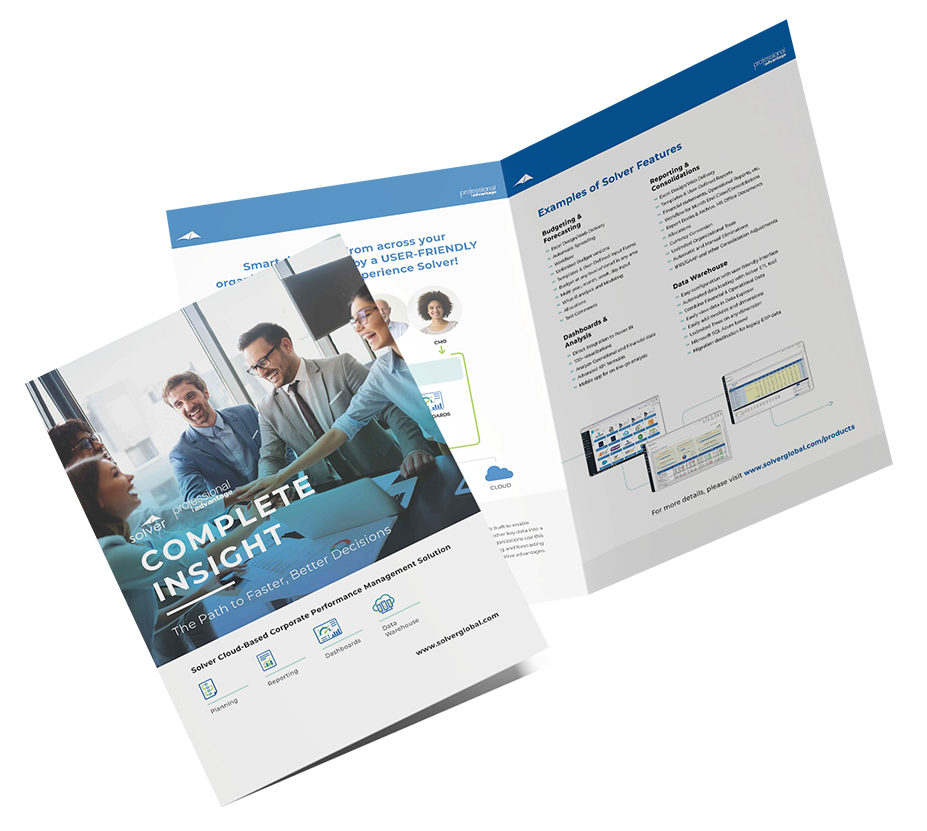
Learn about Solver and how it can help your team on The Path to Faster, Better Decisions by gaining complete insight into your data.
Download our brochure for a summary of Solver’s standout features including:











MacKillop Family Services, alongside Professional Advantage, their partner of 20 years, implements Business Central for better automation, real-time reporting, and system integration.

University of Queensland Unions’ partnership with Professional Advantage and Solver delivers streamlined reporting, improved transparency, and user engagement.

Navigator Global Investments experienced a transformative shift with Solver and its seamless integration to their business systems.
With Dynamics 365 Business Central and Solver, Doylo can manage their membership, facilities, and events as they continue to build their community and add to their real estate portfolio.

Mingara Leisure Group safeguard and future proof their reporting systems by implementing Solver.
Solver supports budgeting, forecasting, and reporting for not-for-profits, helping improve visibility across programs and funds without relying on complex spreadsheets.
“Solver has so much within it already. Whenever we need a report or template, we look there first. It is fantastic.”

Watch this recording to learn about the unique collaboration between Solver and Microsoft and how this transforms manual reporting process into secure, effortless insight for Business Central data and data from other business systems.

If you are a Microsoft Dynamics GP user looking to transform your reporting and planning process, this webinar is for you.

Discover the innovation that the Solver platform brings to reporting and planning processes in not-for-profit organisations.

Watch this on-demand webinar to discover the innovation that the Solver platform brings to the planning, budgeting and forecasting process for SunSystems users.
Solver is an extended financial planning and analysis suite (xFP&A) with an AI-focused strategy that increases access to actionable insights beyond the finance department, to accelerate intelligent decisions. Patented QuickStart integration technology enables immediate access to a collection of tailorable templates, allowing finance and management users to optimise their planning, reporting, consolidation, and analysis processes. Users can get up and running quickly, leveraging familiar Excel-based functionality to create any report and planning model. Solver helps transform organisational data into a strategic advantage for data-driven success. The all-inclusive Solver Suite consolidates information from any data source to provide a single source of truth. Connected with Solver’s budgeting and forecasting, Solver’s comprehensive planning tool enables organisations to manage budgets, create detailed reports and automate forecasts all in one place. These insights are then presented in easily shareable graphs and dashboards. Solver provides organisations with a trusted data source to efficiently drive intelligent and accurate decisions.
Solver is a cloud-based solution and is available for cloud deployment. With a browser and internet connection, you can access Solver from anywhere, at anytime, and on any device such as desktops, tablets, or smartphones.
The Solver Data Warehouse is a Microsoft SQL Azure database residing in Solver’s multi-tenant cloud, located in Microsoft’s global data centres.
Solver has pre-built connectors to almost every source, including Microsoft Dynamics (all ERPs and Customer Engagement). These solutions include:
Yes, Solver has a pre-built connector for Power BI.
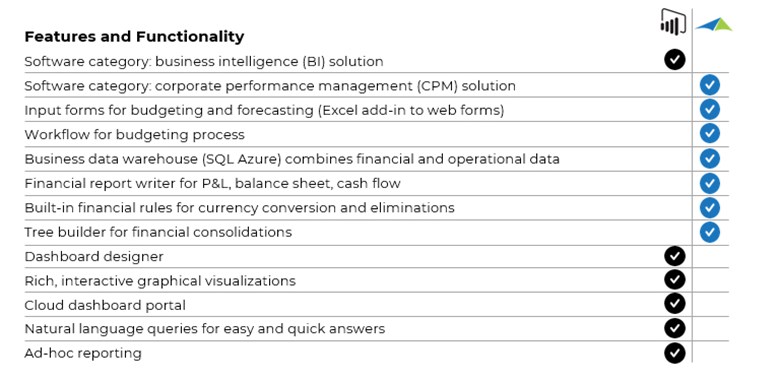
Solver integrates with Power BI dashboards to provide reporting, budgeting, and data warehouse functionality that, combined with Power BI, provides a world-class enterprise solution for planning, reporting, and analysis.
Best of Both Worlds: the image below shows the features and functionality of Power BI and Solver.
Solver is a user-based subscription license. Every Solver tenant receives the following:
With Solver, you can get a complete financial reporting solution in a few days instead of weeks or months. The Solver Marketplace includes 100+ ready-to-use reporting templates, planning forms, and Power BI dashboards, significantly reducing the time it takes to start using the system.
A favourite feature of Solver amongst users is the Excel-based Report Designer.
Since many professionals are already familiar with Excel, this reduces the learning curve for designing reports. Users can quickly leverage their existing Excel skills without having to learn a new, proprietary system.
Below are the top frequently asked questions about Solver, but you can find the full list here.